

Throughout my career as a web developer, I’ve experienced two situations where my local server suddenly stopped working. No warning, no previous errors, no clues.
Losing hours or even days of work because of errors that could have been prevented is frustrating. That’s why I’m writing this article: so you don’t have to go through the same thing.
1. Back Up Your Work at the End of the Day (Seriously)
On 99% of days, your PC works perfectly and your files are exactly where you left them. That makes it easy to trust that everything will be fine. But that 1% failure can cost you a lot.
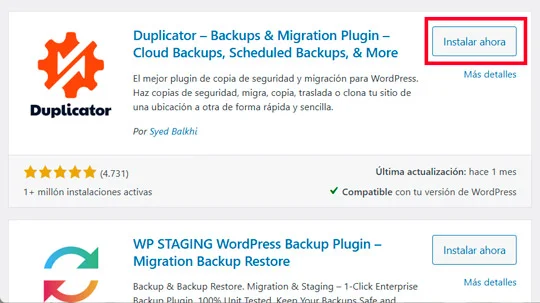
My recommendation: if you’re working with WordPress, install the Duplicator plugin.
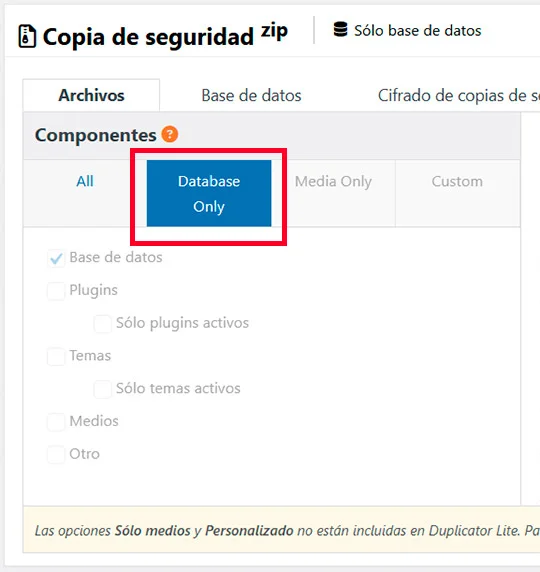
With it, you can create quick backups and even restore only the database if you’ve copied large files manually.
2. Always Run and Install It With Administrator Privileges
A common (and highly avoidable) cause of problems with XAMPP, WAMP, and other local servers is failing to run them as an administrator.
Without elevated permissions, many internal processes may not complete properly.
This was one of the causes behind the errors I experienced, which made me lose access to several projects (and that’s one of the reasons I now use Docker xd).
3. Have a Secondary Local Server Ready (If You Can)
If possible, have a second computer available, even an older one, and configure a local server on it as a backup.
When you’re in the middle of an urgent delivery and your main machine fails, having this “Plan B” can save you several hours in a critical situation.
4. Check the Health of Your Hard Drive
This was the most painful failure. In 2023, my main hard drive started to fail. The cause? Progressive damage that I hadn’t detected in time.
I discovered the problem thanks to CrystalDiskInfo, a free piece of software that tells you when your drive is at risk.
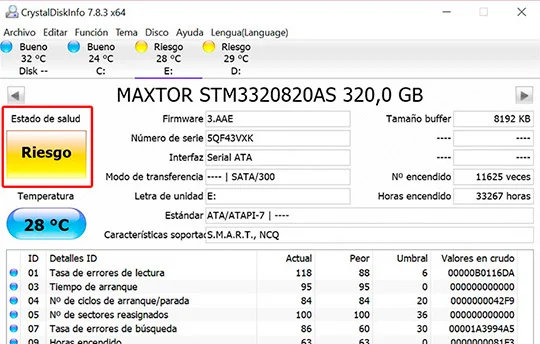
Do yourself a favor and check it at least once a month. A physical drive failure can destroy all your local backups if you don’t have an external or cloud copy.
Preventing Errors Matters (Even the Unlikely Ones)
Working as a developer (not just on websites, but on software in general) teaches you that mastering code isn’t enough. You also need to be prepared for situations like these.
No system is perfect, but good practices can significantly reduce the risks.
I hope this experience helps you avoid losing what we value most: our time and our peace of mind.
